


Widgeet-Color Widgets(Widget)
4.51.04K Reviews
App Specs
- Version
- 1.1.3.7
- Updated On
- License
- Free
- Downloads
- 10,000,000+
- Developer
- Hello Widget
- Categories
- Personalization
- Platform
- Android, iOS
Screenshots
 Analysis by AppCompare
When I decide whether a widget app is worth adding to my phone, I look beyond how attractive its previews are. The useful questions are whether its widgets make information easier to see, whether I can shape them to fit the rest of my screen, and whether the setup feels manageable after the first burst of enthusiasm. Widgeet-Color Widgets is a personalization app from Hello Widget, and its appeal is the chance to make a home screen feel more considered without giving up quick access to everyday details.
It is free to download, rated for Everyone, and has an average rating of 4.4 from around 126,000 ratings. More than 5 million installs suggest plenty of people have tried it, but those figures cannot tell you whether its style suits your own phone. I would treat them as context, then decide based on how much you enjoy arranging a screen and whether the widget types you want are available in a form you like.
Choose widgets for the screen you actually use
A helpful way to approach Widgeet is to start with a problem rather than a theme. Maybe you keep opening your calendar to check the day, or you want a clock that is easier to read at a glance. Pick one practical reason first, then choose a design around it. That keeps the home screen useful instead of turning every open space into another decorative panel.
This matters because widgets compete for room. A large photo or calendar may look balanced in a preview but push your most-used app icons further down the screen. I recommend adding one widget, living with its size and placement for a day, and only then deciding what else belongs there. It is a low-effort way to avoid building a polished layout that feels awkward to use.
Where the customization earns its place
The strongest reason to try a dedicated widget app is consistency. Phone makers provide their own widgets, but their appearance and options can feel limited if you want a particular color palette or a more coordinated layout. Widgeet gives people who enjoy visual tweaking another route: adjust a widget’s colors and fonts, then see whether it works with the rest of the home screen.
There is a trade-off, though. More choices mean more decisions, and a widget that looks distinctive may not be the quickest one to scan. I would favor a clear clock or calendar over a complicated design when the information is something I check in a hurry. The best customization is not the most elaborate one; it is the version that remains legible and useful after the novelty wears off.
A sensible way to test it in daily use
Picture a weekday morning: you pick up your phone to check the time, see what is on your calendar, and start music while getting ready. A compact layout that puts those details within sight can save a few trips between apps. The practical test is whether the information you need is genuinely visible and current when you glance at the screen, not simply whether the arrangement looks good in a screenshot.
Worth Reading Before You Choose

EA SPORTS FC Mobile 26 Is a Bigger Football Game, but It Takes Time

Flipboard Shows What News Apps Must Do Beyond the Feed

Switching to Android Auto Means Rethinking Your Driving Routine

Google Calendar Makes a Crowded Week Easier to Manage

Ludo King Makes the Most of the Minutes Between Plans

Baby Panda World Brings Quick Play to Modern Phones, but Its Game Library Feels Busy
For a calmer setup, I would reserve one area for the widget I check most and keep the surrounding icons familiar. If I am testing a new clock style, I would avoid changing the calendar and photo choices at the same time. Changing one element at a time makes it easier to tell what improves the experience and what only adds visual noise. It also makes undoing an experiment less frustrating.
Unleashing Your Creative Side
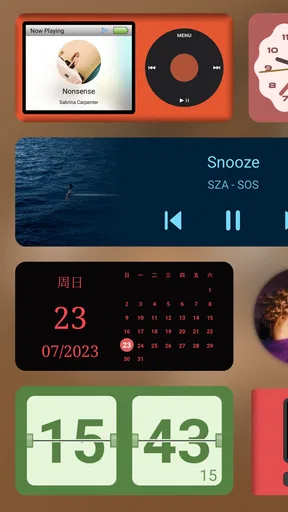
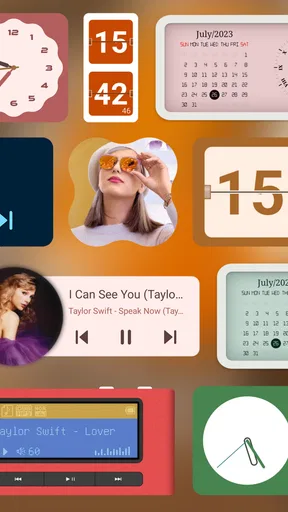
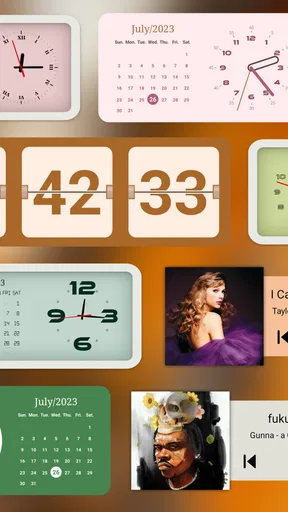
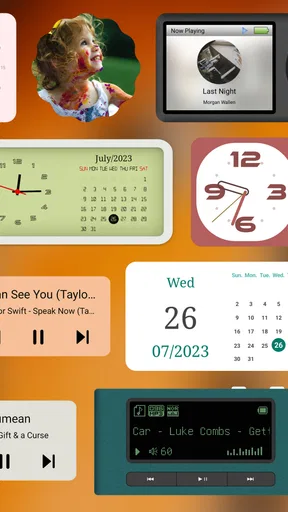
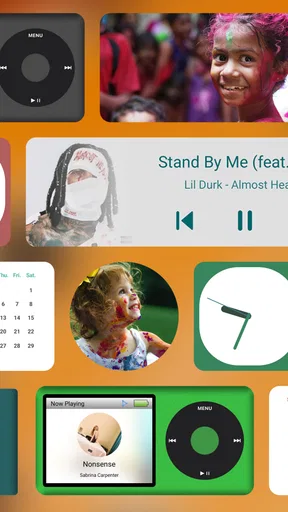
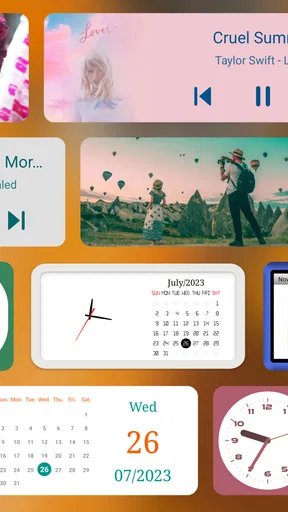
First things first, Widgeet-Color Widgets is all about customization. If you’re someone who loves to tweak every little detail to reflect your personality, you’re in for a treat. The app offers a plethora of widget designs that you can mix and match. From clocks to calendars, and even battery percentage displays, the choices are abundant.
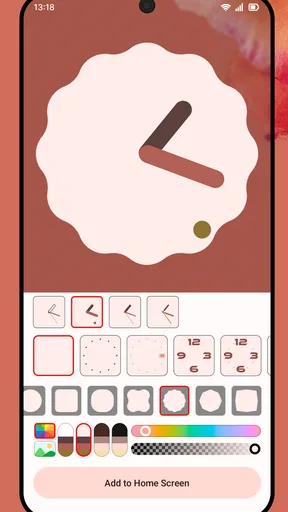
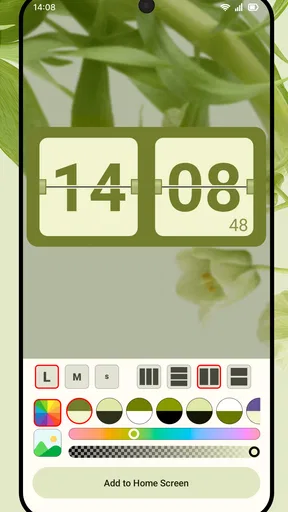
One of the coolest features is the ability to adjust colors and fonts on each widget. Imagine having a widget that matches your favorite outfit or mood. It’s like fashion for your phone. You can go from bright and bold to sleek and minimalist with just a few taps.
Setting Up Your Widgets
Getting started is a breeze. Once you’ve downloaded the app, you’ll find a user-friendly interface that guides you through setting up your first widget. Just pick a widget style, customize it with your choice of colors and fonts, and voila! Your home screen is now a canvas for your creative expressions.
I found the setup process intuitive, with helpful prompts that guide you through each step. And if you’re ever stuck, the app offers a handy help section that answers most of your questions.
Features Galore
Widgeet-Color Widgets isn’t just about looking pretty; it’s packed with functionality too. You can set up widgets to display real-time information like weather updates, step counts, or even your to-do list. It’s a practical way to keep essential info at your fingertips without cluttering your screen.
A feature I particularly enjoyed is the interactive widgets. These let you perform tasks directly from the home screen, such as playing music or checking reminders. It’s a nifty way to streamline your digital life.
Performance and User Experience
Let’s talk about performance. I’ve been using the app on an Android device, and it runs smoothly without a hitch. The widgets load quickly, and I haven’t noticed any lag or crashes. It’s optimized well, making it suitable even for slightly older devices.
As for the user experience, the design is clean and modern. The app is easy to navigate, and the drag-and-drop functionality for arranging widgets is seamless. It’s clear the developers put a lot of thought into making the app as user-friendly as possible.
Where simpler alternatives may fit better
If you only want a basic clock or calendar, the widgets already built into your phone may be the easier choice. They can keep your setup straightforward, and you may not need a separate personalization app just to show information you already check elsewhere. Widgeet makes more sense when its design choices are part of the point, not when you want the fewest possible setup steps.
It may also be the wrong fit if you prefer a home screen that stays nearly empty, or if you rarely look at widgets. A decorative layout takes time to arrange and maintain, even when the controls are approachable. I would skip it if changing colors and fonts sounds like another chore rather than a satisfying way to make the phone feel more personal.
Before committing to a full redesign, try one widget in a place you naturally look. Check whether it is readable in your usual lighting and whether its footprint leaves enough room for the apps you use most. That small trial gives you a better answer than planning an elaborate theme in advance.
What to consider before changing your layout
Moving from familiar home-screen widgets to a new arrangement has a small but real switching cost: you need to rebuild your visual habits. If your calendar is usually in one place, shifting it to a different area can make you pause even if the new design is prettier. I would keep the most important information where your eyes expect it, then use color and typography to personalize it without relocating everything at once.
Think about the balance between a photo and information, too. A photo-focused widget can make a screen feel warmer, while a clock or calendar earns its space by answering a practical question. Combining both is appealing, but each element should have a clear job. If you cannot say what you gain from a widget at a glance, it may be taking space from something more useful.
The app’s current version is 1.1.3.0, and it supports Android 8.0 and later. That makes the compatibility question straightforward for Android users: check your phone’s operating system before installing, particularly if you are using an older device. The app is free, with in-app purchases listed from $4.99 to $12.99 per item, so it is reasonable to explore the basic experience before deciding whether a paid option is worthwhile.
Is It Worth It?
Now, you’re probably wondering about the cost. Widgeet-Color Widgets offers a free version with basic features, which is pretty generous if you’re just looking to dabble in customization. However, to unlock the full suite of features and premium designs, you’ll need to pony up for the paid version. I found it to be reasonably priced for the amount of personalization you get.
If you’re someone who loves to keep things fresh and personalized, investing in the premium version could be worthwhile. It gives you access to exclusive designs and more frequent updates.
My advice is to wait until you know which design or capability you actually want before making an in-app purchase. A free starting point is useful for testing whether you enjoy the setup process and whether a widget earns a regular place on your screen. If you only want a single simple display, paying for more choices may not improve your day-to-day experience.
Final Thoughts
In a world where our devices are extensions of ourselves, apps like Widgeet-Color Widgets offer a delightful way to express individuality. With its extensive customization options and practical features, it’s more than just a pretty face. It’s a tool for making your digital space truly yours.
So, if you’re looking to jazz up your home screen and make it uniquely yours, give Widgeet-Color Widgets a whirl. It might just become your new favorite app.
My recommendation is to try it if you enjoy a bit of visual control and want clocks, calendars, photos, or music-related details to feel more at home on your screen. The developer, Hello Widget, has built an option for people who like to shape their phone’s appearance as well as its practical layout. If you prefer the default look, keep your screen minimal, or do not use widgets often, your phone’s built-in choices may be enough.
In short, I would approach Widgeet as a small home-screen project, not a must-have utility. Start with one useful widget, keep the layout readable, and decide after using it in your ordinary routine whether the added personality is worth the space and setup. That is the point where its customization becomes more than decoration.
Pros
- Highly customizable widget designs.
- User-friendly interface.
- Regular updates with new features.
- Widgets fit perfectly with any theme.
- Battery-friendly performance.
Cons
- Limited free features.
- Ads in the free version.
- Occasional syncing issues.
- Some themes require in-app purchases.
- Limited third-party app integrations.
FAQs for Widgeet-Color Widgets(Widget)
What is Widgeet-Color Widgets, and how does it enhance my device?
Widgeet-Color Widgets is a customizable widget app that allows you to personalize your home screen with a variety of colorful widgets. It offers themes, styles, and sizes to match your device’s aesthetic. By using Widgeet, you can enhance the functionality and appearance of your phone, making it more engaging and tailored to your preferences.
Is Widgeet-Color Widgets compatible with both Android and iOS devices?
Yes, Widgeet-Color Widgets is available for both Android and iOS platforms. The app offers a seamless experience across devices, allowing users to enjoy similar features and customization options regardless of their operating system. This cross-platform compatibility ensures that more users can access its vibrant widget offerings.
Are there any costs associated with using Widgeet-Color Widgets?
Widgeet-Color Widgets offers a free version with basic customization options. However, for users seeking advanced features, premium themes, and ad-free experience, there is a paid subscription available. This ensures that users can choose the level of customization that suits their needs and budget.
How user-friendly is the customization process in Widgeet-Color Widgets?
The app is designed with user-friendliness in mind, featuring an intuitive interface that guides you through the customization process. Users can easily select and modify widgets by choosing from a variety of themes, colors, and sizes. Even those unfamiliar with widget customization will find it easy to navigate and utilize.
Does Widgeet-Color Widgets impact device performance or battery life?
Widgeet-Color Widgets is optimized to minimize its impact on device performance and battery life. While any widget app will use some resources, Widgeet is designed to operate efficiently, ensuring that your device remains responsive and that battery consumption is kept to a minimum during use.


